Audio Recorder can be used when a school needs to record computer microphone or speaker activity on monitored student computers. Use this only where it is allowed by school policy and local law.
This feature allows the teacher or administrator to schedule recordings, start recording manually, download audio files to the console, and review them later.
Typical use cases include:
- Recording language lab speaking exercises.
- Checking audio from supervised online learning sessions.
- Keeping a record when a classroom incident needs later review.
Audio Recorder
Audio Recorder captures student computer microphone/speaker audio, supports scheduled recording, and includes live listen mode for immediate supervision.
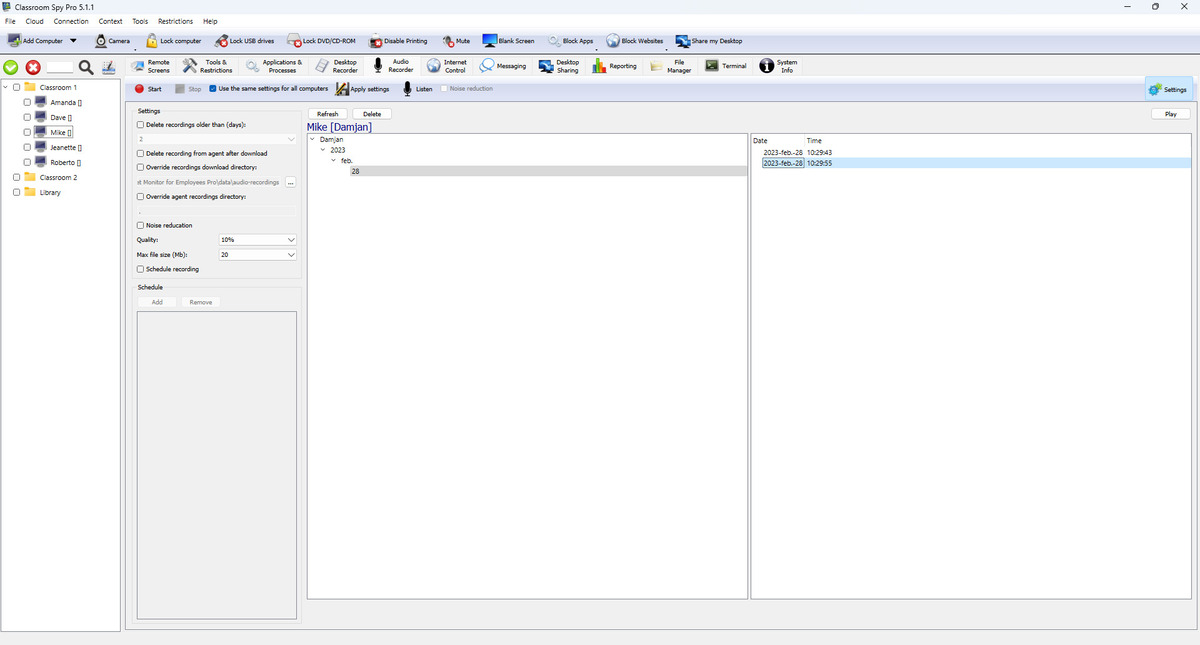
Toolbar Actions
- Start and Stop control recording on selected computers.
- Apply settings saves and sends current profile to student computers.
- Use the same settings for all computers switches between shared policy and per-computer profile.
- Listen starts/stops live audio streaming (with source and noise-reduction options).
Recording Settings Explained
- Record microphone and Record speaker choose capture sources.
- Noise reduction improves clarity on noisy student computers.
- Quality controls compression level.
- Max file size (Mb) rolls to a new file when threshold is reached.
- Schedule recording uses schedule tasks to start/stop automatically.
Storage and Download Pipeline
- Recordings are saved as .ogg audio files.
- Recording storage selects local agent storage or a named external storage profile.
- The console downloads local recordings through a bounded background queue and merges local and remote lists in one browser.
- Delete recording from agent after download keeps student computer storage low.
- Override download location lets you choose where downloaded audio files are stored.
External and Cloud Storage
Audio recordings can be uploaded directly by each student computer to SMB 2/3, SMB 1.0, FTP, WebDAV, SFTP, Amazon S3 or compatible S3 storage, Google Cloud Storage, and Azure Blob Storage.
- See External Storage for detailed configuration instructions.
- Select a profile under Recording storage; files are organized below the configured folder by student-computer host name and audio-recordings.
- Failed uploads remain pending and are retried automatically.
- Optional quotas can delete the oldest recordings or stop recording with an error.
Security warning: SMB 1.0 and FTP are unsafe legacy protocols.
End-to-End Encryption
Encrypt recordings protects local and external-storage audio. See End-to-End Recording Encryption for key backup, selected recordings, remote conversion, rotation, and recovery.
Restore a matching key backup and test encrypted playback.
Use Decrypt all recordings... to stop encrypting new recordings and convert existing console and selected external-storage files in the background. Encrypted originals are removed only after verification; agent-only recordings must first be downloaded. To create unencrypted copies without changing stored originals, select recordings and click Save unencrypted....
Recordings Browser
- Left tree filters by user/date; right list shows recording timestamps.
- The first, unlabeled column uses fixed slots: the content-type slot is empty for audio, followed from left to right by downloaded to this console, encrypted, and on external storage. The lock is after the download slot. See the recording status icon legend.
- Download to console, Encrypt, and Decrypt apply to selected recordings. Encryption changes can process console copies, external-storage files, and files on a connected student computer directly. An offline computer's only copy must become accessible before it can be processed.
- List supports playback and file actions for selected records.
Language-lab recording example
The desktop Agent uses the default microphone device. Windows speaker capture uses WASAPI; Linux uses a PulseAudio monitor and needs libpulse.so.0 plus access to the audio session. The current macOS recorder has no speaker-loopback implementation: use the microphone. Device availability and OS microphone permission still apply; confirm the intended source with a short recording.
Illustrative check on one connected computer, LAB-07; these are reproducible steps, not a captured test result.
Schedule recording → Schedule → Apply settings → Recordings → Play
- Select LAB-07. For an individual setup, clear Use the same settings for all computers. Select Record microphone and clear Record speaker so the lesson playback is not mixed with the learner's voice.
- Enable Schedule recording. In Schedule, add today's weekday with a two-minute period starting shortly ahead. Apply the settings before that period. Keep the computer and its audio session available.
- During the period, speak a short agreed phrase. Wait until the period ends and recording stops; for an immediate unscheduled check, use Start and then Stop instead.
- Open Recordings, refresh the list, select the new dated .ogg recording and click Play. Check the phrase and duration; Listen is live audio and does not prove that a saved recording plays.
Expected check: a new recording appears and the saved sound is audible. If the list is empty, check schedule, source, connection and storage; if playback is silent, check the default input and its permissions. For encrypted or external recordings, also follow the key and storage checks.