Messaging can be used to send instructions, warnings, or questions to selected student computers without interrupting the whole classroom.
This feature allows the teacher to show a message, optionally lock the student screen while the message is visible, and collect answers from students.
Typical use cases include:
- Sending a short instruction to selected students.
- Warning a student before applying stronger restrictions.
- Asking students to confirm that they finished a task.
- Displaying a lesson reminder while students work independently.
Messaging
Messaging sends announcements or questions to selected computers and can collect user answers in real time.
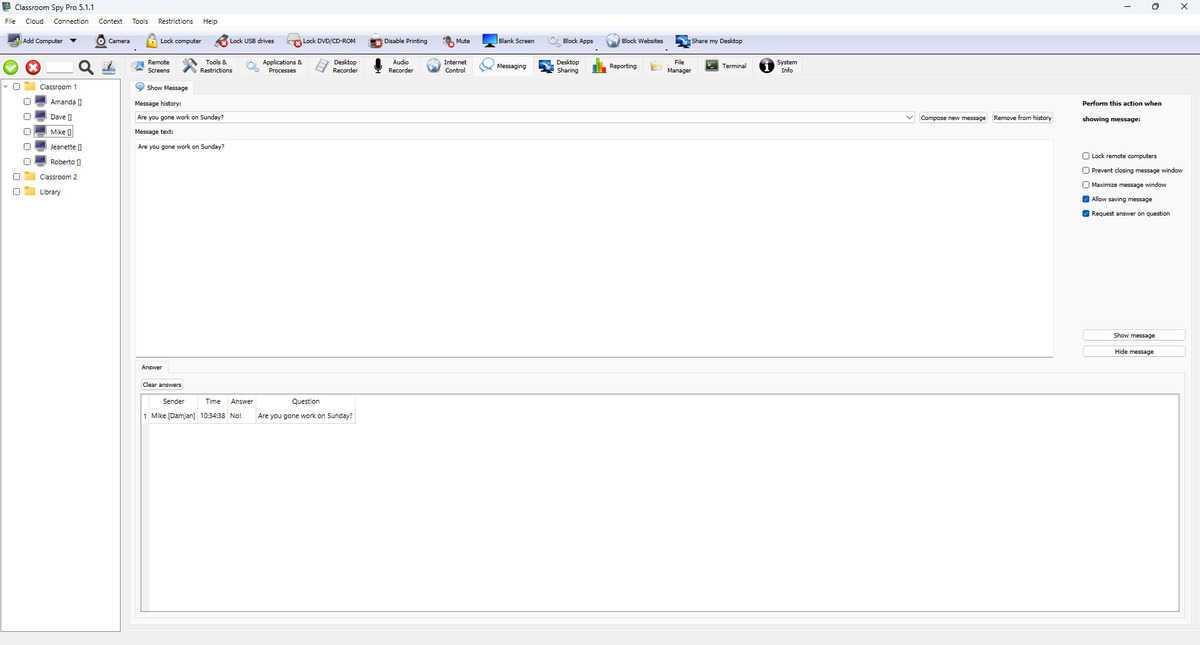
Compose and Reuse Messages
- Message history stores reusable templates.
- Compose new message starts a fresh draft.
- Remove from history deletes selected template.
- Message text supports formatted content.
Show Message Options
- Lock student computers blocks workstation input while message is visible.
- Prevent closing message window keeps message on screen until admin hides it.
- Maximize message window shows message fullscreen.
- Allow saving message enables student computer copy/save actions.
- Request answer on question shows answer field and sends answers back to console.
Show / Hide Workflow
- Prepare message text and options.
- Click Show message to display on selected student computers.
- Click Hide message to close active message windows remotely.
Answers Tab
- Answers table shows sender, time, answer text, and related question.
- If answer is required, student computer user is prompted until answer is submitted.
- Clear answers removes collected answers from current console view.