Reporting can be used to review student computer activity after class. Reports help teachers and school administrators understand which applications, websites, and keyboard activity were used on monitored computers.
This feature allows you to filter activity by student computer, user, date, and report type, then export records when you need them for later review.
Typical use cases include:
- Checking which websites were opened during class.
- Reviewing which applications students used during a computer lab session.
- Looking at idle time to understand whether a computer was actively used.
- Exporting activity records for school administration or parent meetings.
Reporting
Reporting aggregates historical student computer data into searchable analytics for student activity, application usage, website usage, and keystrokes.
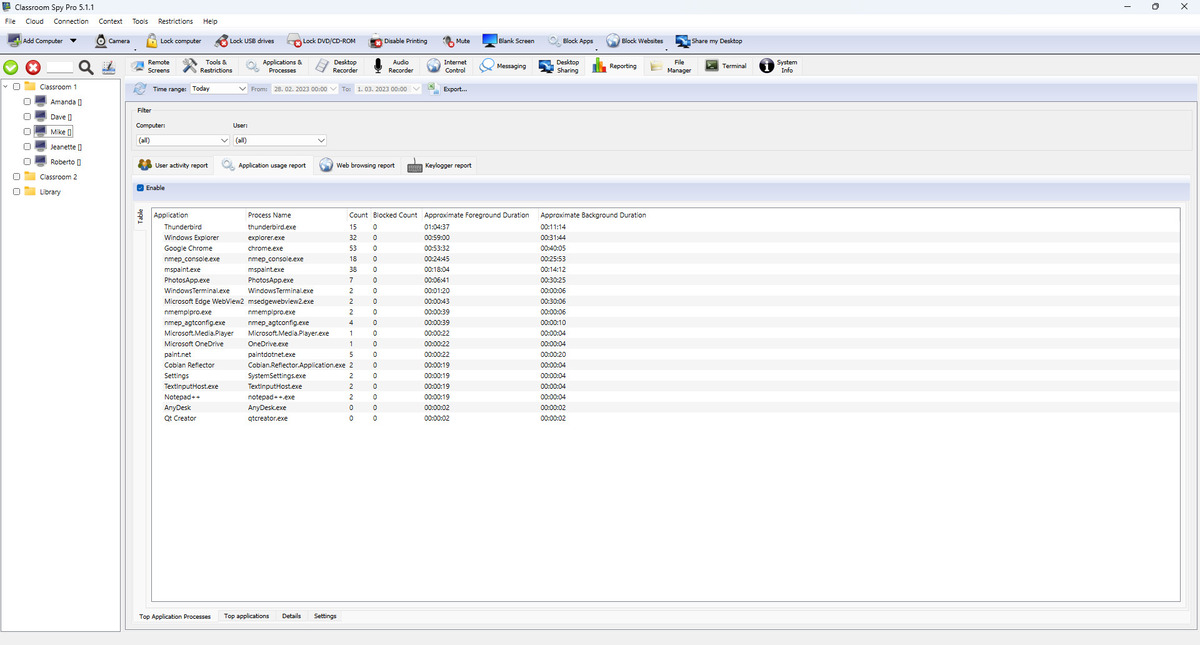
Toolbar and Global Filters
- Refresh loads new records and updates report totals.
- Time range presets include today/yesterday, week/month presets, last 7/14 days, and custom range.
- Filter controls narrow results by computer and user (plus application where relevant).
- Export... saves current report output to file.
Reports
- User activity report: shows when the student was active or idle, plus logon/logoff timeline. Use this report to understand active computer time for each student.
- Application usage report: shows which applications and processes were used most. Use this report to see if students spend time in approved classroom software.
- Web browsing report: shows visited websites and full URLs. Use this report to review lesson-related browsing and identify unrelated browsing.
- Keylogger report: shows captured typed text and key sequences. Use this report when you need detailed activity evidence for investigations.
Settings In Each Report
- Enable turns logging on or off for that report type.
- Save configuration persists settings.
- Retention settings can remove old records on student computers and in teacher console archive.
- External logger can send report events as JSON to another web address, with an optional header key and value.
External Logger JSON Examples
External logger sends JSON data to your configured URL using HTTP POST and Content-Type: application/json; charset=utf-8. If you set custom header key/value in the UI, that header is also sent. The examples below match the fields used by the application. Each payload also includes computer/session fields such as host, hwid, user, userfullname, ntdomain, terminal, session, ipv4, ipv6, pipv4, and pipv6.
User activity report event
{
  "time": "2026-04-29T08:45:10+02:00",
  "event": "Active",
  "duration": 300,
  "pid": 9152,
  "executable": "chrome.exe",
  "name": "Google Chrome",
  "caption": "Classroom Assignment - Chrome",
  "update": true,
  "host": "LAB-01",
  "user": "student01",
  "session": 1
}
Application usage report event
{
  "time": "2026-04-29T09:10:00+02:00",
  "event": "InForeground",
  "pid": 14520,
  "executable": "excel.exe",
  "name": "LibreOffice Calc",
  "caption": "Lab Results.ods - LibreOffice Calc",
  "class": "SALFRAME",
  "cmd": "\"C:\\Program Files\\LibreOffice\\program\\scalc.exe\" \"C:\\Classwork\\Lab Results.ods\"",
  "host": "LAB-01",
  "user": "student01",
  "session": 1
}
Web browsing report event
{
  "time": "2026-04-29T09:22:14+02:00",
  "event": "Opened",
  "pid": 14520,
  "url": "https://school.example.edu/assignments/biology-lab",
  "title": "Biology Lab Assignment - School Portal",
  "browser": "chrome.exe",
  "host": "LAB-01",
  "user": "student01",
  "session": 1
}
Keylogger report event
{
  "time": "2026-04-29T09:25:51+02:00",
  "pid": 9152,
  "name": "Google Docs",
  "executable": "chrome.exe",
  "class": "Chrome_WidgetWin_1",
  "caption": "Essay Draft - Google Docs",
  "keystrokes": "The answer is{{Return}}",
  "host": "LAB-01",
  "user": "student01",
  "session": 1
}
Some fields are sent only in specific situations (for example duration on close/background events, or update on user-duration updates).
How Reporting Works
- Console downloads logs from connected student computers into local report storage.
- Report totals and charts are updated from downloaded records.
- Status indicators show when data is loading, processing, or exporting.