Desktop Sharing can be used when a teacher wants to show their screen, or one student screen, to other students.
This feature allows you to present a demonstration, show a correct solution, guide students through software steps, or let the class watch a student example.
Typical use cases include:
- Showing the teacher desktop to the whole classroom.
- Sharing one student screen as an example for the class.
- Guiding students through a new application.
- Showing a correction without using a projector.
Desktop Sharing
Desktop Sharing sends the presenter screen to all selected computers. You can share your own desktop or share one selected student computer screen to all selected computers.
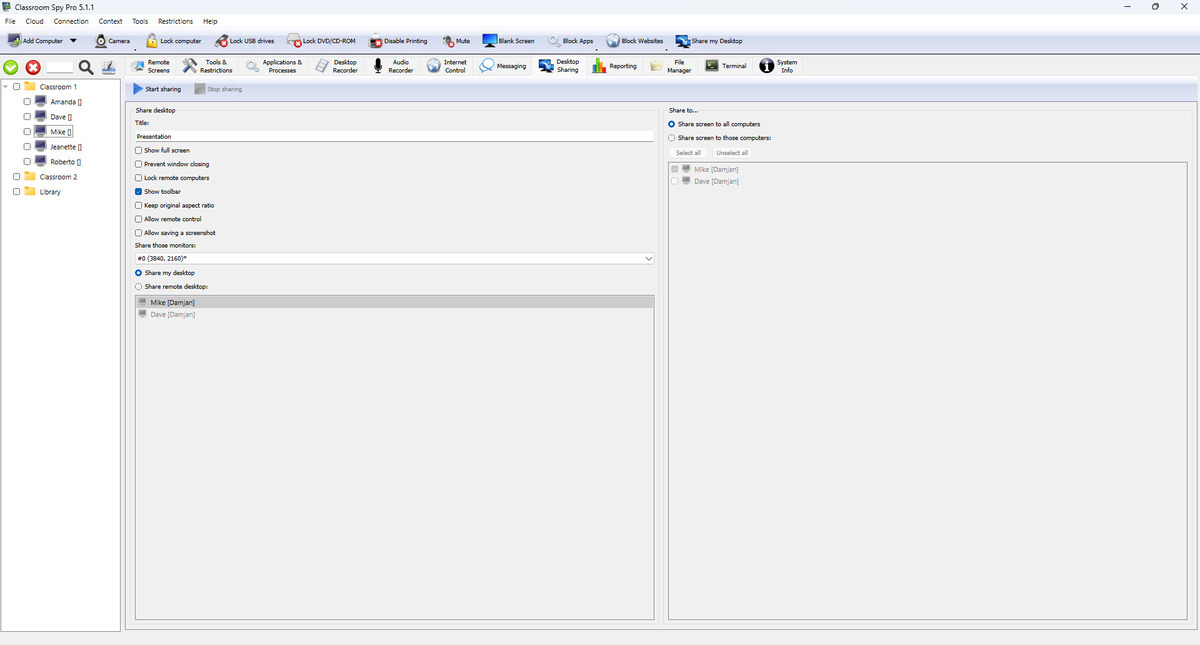
Source Selection (What You Share)
- Share my desktop uses local console screen as source.
- Share remote desktop uses one connected student computer as the source screen.
- Share those monitors selects all monitors or specific monitor from source side.
- Present on this monitor selects where presenter window opens on your workstation.
Target Selection (Who Receives)
- Share screen to all computers sends session to all connected targets.
- Share screen to those computers enables manual target list.
- Select all and Unselect all speed up list management.
Session Options Explained
- Title sets the text students see in the sharing window title bar.
- Show full screen opens the shared desktop in full-screen mode on student computers.
- Prevent window closing stops students from closing the sharing window during the session.
- Lock student computers blocks normal keyboard and mouse usage so students stay focused on the presentation.
- Show toolbar shows the sharing toolbar in the viewer window.
- Keep original aspect ratio keeps the screen shape correct and avoids stretched image.
- Allow remote control lets participants control the shared screen with keyboard and mouse when needed.
- Allow saving a screenshot lets participants save a screenshot from the shared session.
- Start sharing starts the session on all selected computers after confirmation.
- Stop sharing ends the session on all selected computers immediately.